CAPTCHA widget
A bot-protection widget that fits your site
One script protects your forms. Show it invisibly, as a checkbox or as a compact badge — the protection is the same — and set theme, language and badge per API key.
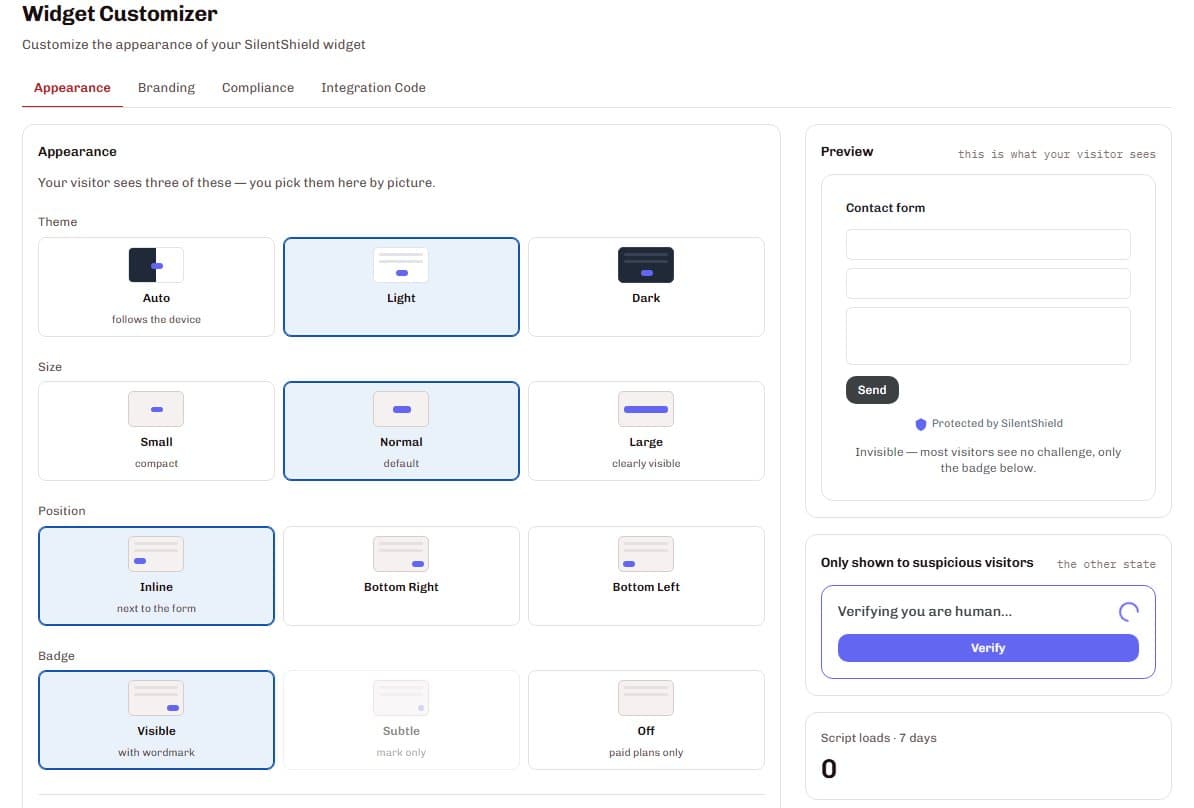
The SilentShield widget protects a form with a single script. It can stay invisible, show a reCAPTCHA-style checkbox or a compact badge; all three run the same behavioural analysis. You set theme, language, position and badge per API key, the widget speaks 25 languages, and a short fallback question appears only when a check cannot be completed in the background.
From the script to the look you want
Add the script
Put one script on your pages, or use the WordPress plugin.
Pick the look
Invisible, a checkbox or a compact badge — set per API key in the dashboard, with a live preview.
Match your site
Theme (light, dark or automatic), language, size, position and badge.
Visitors pass or are asked
Most visitors see nothing more than the badge; only a suspicious visit is asked to prove itself.
The visible box never blocks a submission on its own: it reports that the check ran. The classification stays in your dashboard.
What it gets you
The same protection in three looks
Invisible is the default; a checkbox makes the protection visible; the compact badge settles once the check is done. All three run the same behavioural analysis.
A look per website
Theme, language, position and badge are set per API key, so every site of yours can look like its own.
25 languages
The widget and its fallback question speak 25 languages. With the setting “auto”, it follows the visitor's browser language.
Usable for everyone
Keyboard navigation, screen-reader labels, reduced-motion and high-contrast support, and text-to-speech for the fallback question.
Details that matter
Badge placement
Inline below each protected form, or once per page in a bottom corner. Free plans show a “Protected by SilentShield” badge; paid plans can hide it.
A fallback without a clock
If a check cannot be completed in the background, a short maths question appears — without a countdown and with text-to-speech.
Live preview
The customizer shows what visitors see, including the state shown only to suspicious visitors.
Data protection
SilentShield sets no cookies and tracks nobody across sites. With Zero-PII mode switched on, browser fingerprinting is disabled and only behavioural signals are used.
Questions and answers
Is the protection weaker when the widget is invisible?
Can each website have its own look?
Which languages does the widget support?
Can people who cannot see the screen use it?
Related pages
Technical details
Setup and reference are in the documentation: